Reading lists
TBR List: What It Means, How to Build One, and How to Keep It Under Control
A TBR list helps you remember books you want to read without making you decide on all of them today. Learn what TBR means, how it differs from a wishlist or current read, and how to find your next book in a long list.
What does TBR mean?
TBR stands for to be read. A TBR list is a personal list of books you want to read in the future. It can include books you own, hope to borrow, or might look for later. It does not have to be read in the order you added each title.
What does TBR mean in books?
In reading, TBR means to be read. Readers use “my TBR” for the books they want to read and “TBR list” for the record of those titles. A physical stack waiting on a shelf is sometimes called a TBR pile. The size and rules of the list are up to you.
The term is informal, so a TBR can mean a short queue for the next few weeks or a broad list of books to consider someday. Goodreads has a “Want to Read” shelf for future reads, and you can add custom shelves when you want more ways to group titles. See the TBR definition and Goodreads guide to custom shelves.
TBR vs wishlist vs currently reading
These lists can contain some of the same books, but each one answers a different question. Keeping the purpose clear makes a large library easier to browse.
| List | Question it answers | Example use |
|---|---|---|
| TBR | What would I like to read? | Books you may choose for a future read. |
| Wishlist | What would I like to buy or get? | Books you want to purchase, request, borrow, or gift. |
| Currently reading | What have I started? | Books you are reading now, even if you pause between sessions. |
A book can be both on your TBR and wishlist if you want to read it but do not own a copy yet. Once you start it, move it to your currently reading list. The labels help you choose what to do next; they do not need to follow one universal system.
Ways to maintain a TBR list
Pick a system that is easy to update when someone recommends a book and easy to search when you are ready to read. You can always move to a more detailed tracker later.
Paper notebook or cards
A notebook is quick to jot in and pleasant to browse. Add a bookmark or a few tabs if you want separate sections for next reads, book club picks, and someday titles. Finding a specific book can take longer as the list grows.
Spreadsheet or Notion
A table lets you keep a title, author, priority, series, and notes together. Sort or filter the list when you have a particular mood or format in mind. Decide which columns you will actually update before adding more.
Goodreads
Goodreads gives you a “Want to Read” shelf and lets you create custom shelves for extra groups. For example, you might keep book club picks or titles recommended by a friend together. Its To Read shelf is one way to keep saved books in one place.
Book tracker
A reading tracker can keep your TBR near your in-progress books and completed reads. Choose one that records the details you care about, such as ownership, series, collections, or reading history.
How to build a useful TBR list
Capture the title and author
Save enough information to find the book again. If several books share a title, include the author or edition you meant.
Write down why it caught your attention
A short note such as “recommended by Sam,” “book club,” or “for the train” can help the title make sense months later.
Mark whether you can read it now
Note whether you own it, have a library copy, need to borrow it, or still want to find a copy. That way, your next pick can be something you can actually start.
Group books only when it helps
Use a few useful labels such as “book club,” “short reads,” or a genre you often browse. A long set of overlapping tags can create more sorting work than it saves.
A simple TBR list template
Copy these columns into a notebook, spreadsheet, or reading tracker.
| Title and author | Why I saved it | Priority | Owned? | Series and order | Collection |
|---|---|---|---|---|---|
| Book title, author | A friend recommended it | Next or later | Yes, no, or borrowed | Name and number, if useful | Book club, mood, or genre |
Start with title, author, and one note. Add the other columns only if you find yourself needing them.
How to prioritize a large TBR
A long TBR does not have to be a reading schedule. Split the list into three flexible groups so you can keep every saved title without facing the whole list each time you finish a book.
Now
A few books you would be happy to start next.
Next
Books you expect to consider soon, but not necessarily in order.
Later
The rest of your ideas, ready when your mood or plans change.
When you need a new book, check three things: what you feel like reading, what you can access now, and how much time or attention you want to give it. Move a book from Later to Now when it fits. If a title no longer interests you, remove it without treating that as a failure.
Track series and books you do not own
For a series, record the series name and the book number if you want to follow a particular order. Keep the series together in a collection or filter so the next volume is easy to find. If you are happy to read out of order, note that too. The list should help you make your choice, not turn a suggested order into a rule.
A TBR can mix books on your shelf with books you have not found yet. Track ownership separately from reading status: “to read” answers what you plan to read, while “owned” answers whether you have a copy. Add a note or collection for borrowed and library books if your tracker does not have a separate field for them.
Organize a Goodreads TBR list
Goodreads calls its main TBR shelf “Want to Read.” You can also create custom shelves to group titles, such as by book club, mood, or whether you own a copy. Keep the main shelf for books you might read and use a few extra shelves for details that help you choose.
If you are looking at other ways to manage a reading list, compare the Goodreads alternatives. If you decide to move your books, read the guide to exporting a Goodreads library first so you know what the CSV includes.
Use Inkshelf to manage your TBR
Inkshelf includes a “To read” status for books you have not started. Filter by status, collection, series, and whether you own a copy, then save the view you want to return to. You can keep a whole TBR in one place and make a short “Up next” view for the books you are considering now.
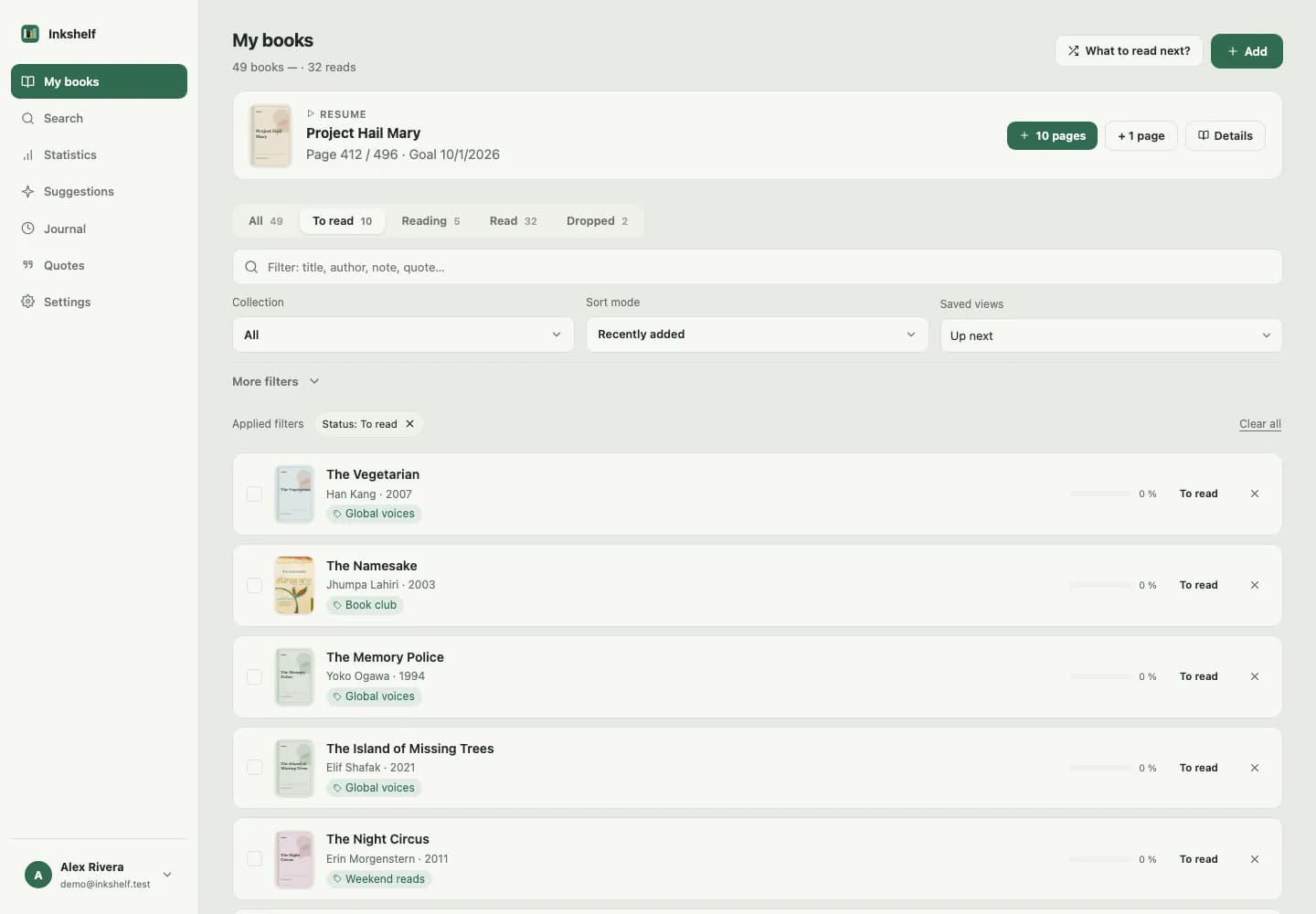
See how Inkshelf helps you organize a book library and track your reading.
Create your TBR in Inkshelf
Keep your next reads with your library, then filter to the books you are ready to start.
Create your TBR in InkshelfCommon questions about TBR lists
What does TBR stand for?
In reading, TBR stands for “to be read.” It usually means the books a reader wants to read in the future. People may use “TBR” for the list itself, a stack of unread books, or a shorter selection for a particular month or reading challenge.
How many books should be on a TBR list?
There is no required number. Keep as many titles as you like in your full list, then make a smaller shortlist when you need to choose. If a large list feels stressful, hide or archive older ideas and bring them back only when they interest you again.
Is a TBR the same as a wishlist?
Not quite. A TBR is about what you want to read, while a wishlist is about what you hope to get. A book you want to read but do not own can appear on both. If it is on your wishlist only because you want to own it, it does not have to be on your TBR.
How do I organize a Goodreads TBR shelf?
Keep Goodreads’ Want to Read shelf for future reads, then add a small number of custom shelves for groups you often browse. For example, use one for book club picks or a specific mood. Goodreads explains how to create custom shelves in its help center.
How can I keep a TBR from getting overwhelming?
Keep the complete list as a place to save ideas, not as a promise to read every title. Make a short Now group, review it when your mood changes, and remove books that no longer appeal to you. A TBR should make choosing easier, not create a deadline.