ISBN scanner
Scan book ISBNs and build a searchable library
Use your phone camera in Inkshelf to read a book's ISBN barcode, find its catalog details, and add the title to your library. Check the edition before saving, then add the shelf and reading details that matter to you.
From barcode to book record
- Read the ISBN printed in a book barcode.
- Look up the available title, author, and cover details.
- Confirm the result against your physical edition.
- Add missing information or create a record manually.
An ISBN points to an edition
A paperback, hardcover, and ebook of the same story may carry different ISBNs. Scanning helps identify the edition in your hand, but the barcode does not know whether you own the book or where it sits in your home.
Catalog data can be incomplete. A cover or publication detail may be missing, and some books have no readable ISBN barcode. Inkshelf lets you search by title or create a record manually when the scan does not produce a useful match.
See the book before adding it
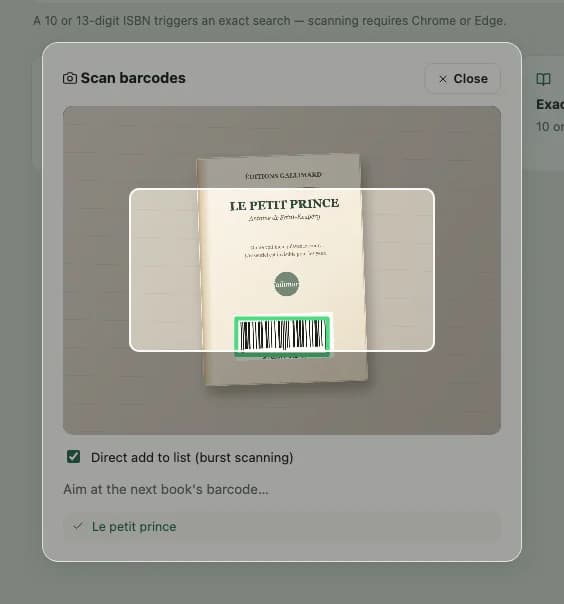
Make the scan part of a useful catalog
Check the edition
Compare the suggested title, author, cover, and publication details with your copy before saving.
Add your own details
Mark ownership, shelf location, collection, and reading status. These are details a barcode cannot supply.
Spot exact duplicates
Inkshelf rejects an ISBN already in your account. Search by title as well if you own several editions of one work.
Scan an ISBN in Inkshelf
Open the book scanner
On your phone, open Add in your Inkshelf library and allow the browser to use your camera.
Aim at the ISBN barcode
Scan the barcode on the book. If it cannot be read, type the ISBN or search for the title instead.
Review and finish the record
Confirm the match, add the book, and enter your shelf location or collection.
ISBN scanning questions
Will scanning a barcode fill every field?
It fills the details available from the matching catalog record. Check the edition and complete ownership, location, or collection yourself.
Can I add an older book without a barcode?
Yes. Search its title or enter a new book record manually. You do not need an ISBN to keep it in your personal library.
Can I scan two copies with the same ISBN?
Inkshelf keeps one record per ISBN per account. If you own two identical copies, note the second copy in that record rather than expecting another ISBN entry.
Add your next book by ISBN
Scan the barcode, check the edition, and keep your copy in a searchable library.
Scan my first book