Reading log
How to Track the Books You Read: 6 Simple Methods
A reading log can be a notebook, a spreadsheet, a social profile, or an app. The best log is one you can keep up to date. Compare six ways to track your books, decide what details to save, and see how to keep rereads from replacing your earlier history.
The short answer
- Record the title, author, reading status, and finish date.
- Keep one entry for each completed read if you want rereads counted.
- Choose a format you can update and search without much effort.
- Save a copy or check export options before relying on a service.
What is worth tracking?
Start with details that help you recognize a book and remember when you read it. Add more fields only when they answer a question you actually ask later.
- Title and author. Add an edition, format, or ISBN if you need to tell two versions apart.
- Status and dates. A simple status set is To read, Reading, Read, and Dropped. Start and finish dates make an annual recap more accurate.
- Pages or progress. Save the current page while a book is in progress. If you track pages over time, keep session totals separate from the book's printed page count.
- Your response. A rating, a few personal notes, or a quote with its page can help you remember what stayed with you.
- Each reread. Keep a separate record for each completed read if you want to count reading events or revisit each set of dates and notes.
A simple reading log template
Title | Author | Status | Started | Finished | Pages | Rating | Note
A compact log can have fewer columns. Keep title, status, and finish date first, then add pages, ratings, or notes when they are useful.
Six ways to track the books you read
Each method trades convenience for structure, search, or detail. Use the table to narrow the choice, then start with the smallest log that answers your needs.
A quick comparison of reading log methods
| Method | Good fit when | Tradeoff |
|---|---|---|
| Paper notebook or cards | You like handwriting or drawing as you read. | Searching and counting later take manual effort. |
| Notes app or document | You want to start quickly and write freely. | Long lists can be hard to filter consistently. |
| Spreadsheet | You want custom fields, sorting, or yearly totals. | You set up the columns and maintain them yourself. |
| Notion or another database | You want notes connected to books and filtered views. | A flexible setup can take time to build and maintain. |
| Goodreads or a social reading site | You want a reading list alongside reviews or community. | Your log follows that service's fields and account. |
| Dedicated book tracker | You want progress, completed reads, and stats together. | Features, access, and export options vary by product. |
1. Use a paper reading log
Give each finished read one line with the title and date. Leave space for a short reaction, and use a new line if you read the same book again. A year divider or an index can make old entries easier to find.
2. Keep a list in a notes app
A note on your phone or computer works well when you want to capture a title right away. Use the same short pattern for every book, such as title, author, finish date, and one thought.
3. Make a spreadsheet
Put each completed read on its own row. Filter the finish date by year to count your reading, and sort by author, rating, or format when you want a different view. Use a new row for a reread rather than replacing the first one.
4. Set up Notion or a database
Create fields for status, dates, pages, and notes, then make a view for finished reads or a particular year. If you make one record per reading event, it is easier to preserve rereads than if one book page has only one finish date.
5. Use Goodreads or a social reading site
This can be convenient if your reading list already lives there or you want to share ratings and reviews. Check which dates and reading details the service keeps, and whether they are included in its export.
6. Choose a dedicated book tracker
A tracker may connect a book entry to your current page, sessions, completed reads, and notes. Check whether it fits the devices you use and keeps separate dates for rereads. For named app features, see our book tracking app comparison.
How to keep a reading history you can trust
A book title and a completed read are related, but they are not always the same record. If you reread books, decide whether your total means finished reading events or distinct titles. Either measure is useful when you label it and use the same rule from year to year.
- Use the finish date for yearly totals. A book started in December and finished in January belongs to the year it was completed if that is the rule you choose.
- Separate finished reads from in-progress books.Keep the current page or session for a book you have not finished. Add it to a completed-read total only when you mark it finished.
- Preserve rereads as their own events. Keep each finish date and any rating or notes for that read. One title can then have a longer history without inflating a distinct-title count.
- Keep a backup you can use. If you choose an online service, check what its export contains. A separate copy helps if you switch tools or want to keep a long-term archive.
Example reading history
| Title | Started | Finished | Read |
|---|---|---|---|
| Example title, fictional | March 3, 2026 | March 19, 2026 | First read |
| Example title, fictional | September 2, 2026 | September 10, 2026 | Reread |
This history contains two completed reads and one distinct title. Keeping both entries means you can calculate either total later.
An example reading workflow in Inkshelf
This is one example of a dedicated tracker in use. A notebook or spreadsheet can keep the same information if you prefer to maintain your log yourself.
- Add or find the book. Keep its title and author in your library so later reading entries point back to the same book.
- Mark it as reading. Update your current page or record a session as you read.
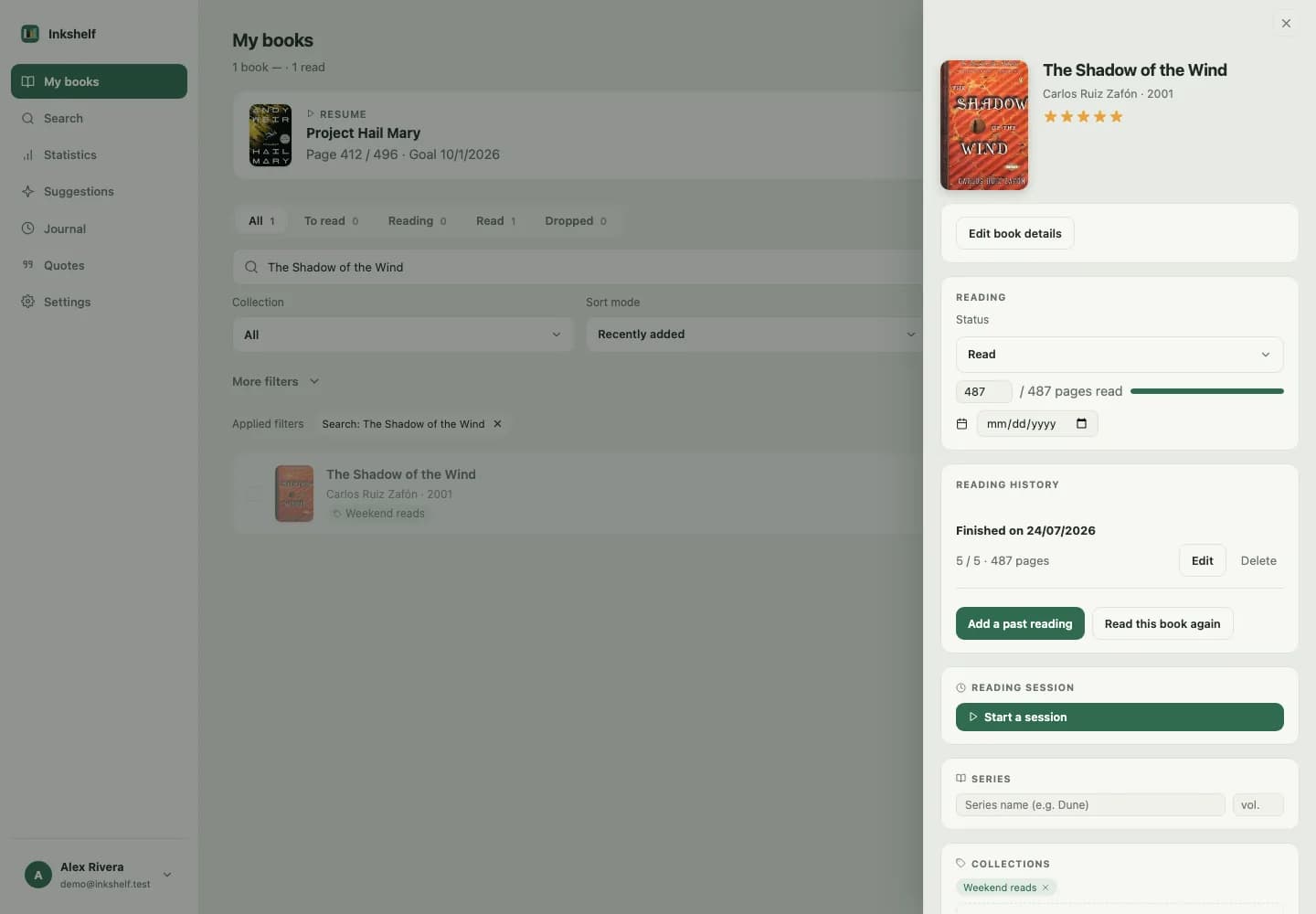
- Finish the book. Its reading history can keep the start date, finish date, page count, and rating for that completed read.
- Start a reread when you want. It creates another history entry, leaving the earlier dates and rating in place.
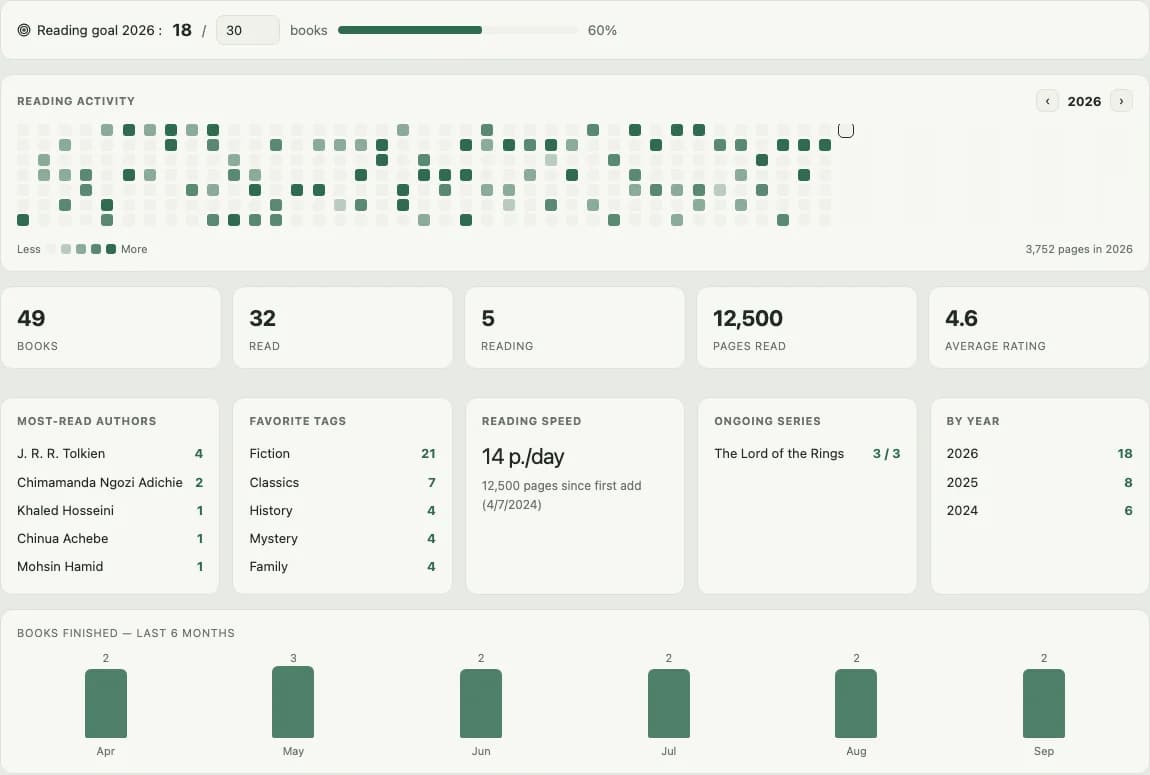
The statistics page can then show reads by finish year, reading activity, pages, and progress toward a goal. Goals are optional. You can use the history without setting a target.
To compare specific apps, their platforms, and features, continue to our book tracking apps guide. For a list of books you want to read next, see the guide to building a TBR list.
Common questions about tracking books read
How do I count the books I read in a year?
Filter your log to books finished between January 1 and December 31. Decide whether you count each finished reading event, including rereads, or only distinct titles. Keep the same rule each year.
Should a reread count as another book?
Count it if you want to measure completed reads. If you want to know how many different titles you finished, count each title once. Keeping a separate entry for the reread lets you calculate either total later.
What should I write in a reading log?
Title, author, status, and finish date are a useful start. Add pages, a rating, notes, or a quote if those details help you remember the reading.
Can I track books without using an app?
Yes. A notebook, notes app, spreadsheet, or database can work. Choose a format you will update and keep a copy of your log if the information matters to you over time.
What is the difference between a reading log and a TBR?
A reading log records books you have started or finished. A TBR list holds books you may want to read in the future. They can live in the same library, but answer different questions.
Choose a reading log you will keep using
Start with the title, status, and finish date. Choose a notebook, spreadsheet, database, social platform, or tracker based on whether you want handwriting, free-form notes, easy totals, or reading history in one place. Add more detail only when it helps you look back.
Start tracking your reading in Inkshelf
Keep your books, current progress, completed reads, rereads, and yearly statistics together.
Start tracking my reading